
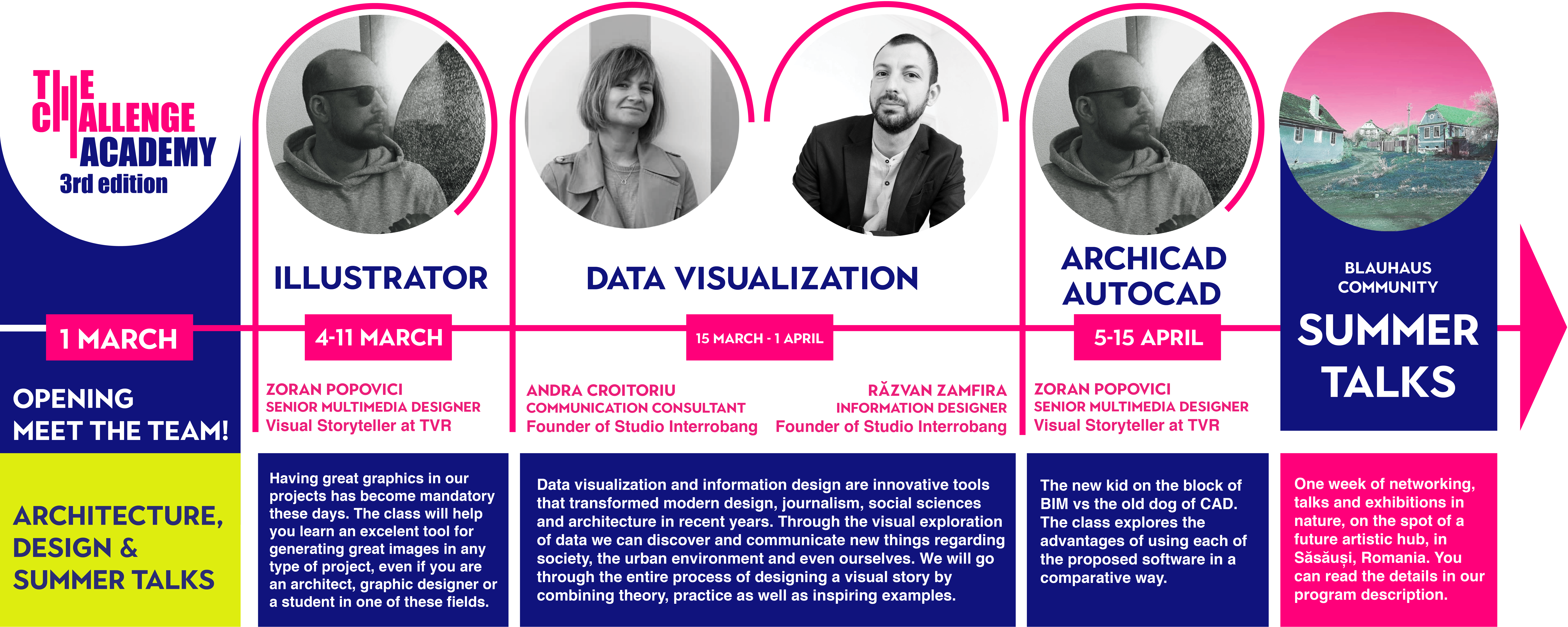

Illustrator
Zoran Popovici
The course we propose covers the theoretical introductory notions, wrapped up as practical exercises – logo design and flyer layout design, aimed to bring you to an intermediate level in regards to Illustrator knowledge.
- Introduction in programme interface.
- Notions regarding lines and shapes in Illustrator.
- We start designing a logo.
- Color, shapes and their interactions.
- Layers.
- We finish the drawing of a vectorial logo.
- Layout, art boards, grid, external content, text.
Plotting.
We will work on the structure of a flyer.

Data Visualization
Andra Croitoriu & Răzvan Zamfira
Data visualization and information design are innovative tools that transformed modern design, journalism, social sciences and architecture in recent years. Through the visual exploration of data we can discover and communicate new things regarding society, the urban environment and even ourselves. We will go through the entire process of designing a visual story by combining theory, practice as well as and inspiring examples.
Data Visualisation – a new language for visual communication
- What is data visualisation?
- Visualising information. A brief history.
- Data visualization and contemporary design
- What will you learn during this course?
Understanding your audience, defining the research question and exploring the data
- Types of audiences
- How to structure a research question
- How/ where can we find & collect data?
- Your personal data visualization project. Choosing a subject, asking (the right) questions and collecting data.
- What lies hidden in your data? (basics statistics)
- How to work in Google Sheets
Visual vocabulary
- Visually coding the information
- How to choose the right colours, icons and fonts
- Types of charts
- Examples of great data driven stories
- Storyboards – How to structure your visual data story
Data Visualization Tools
- Sketching with pen and paper
- How to use online tools to turn numbers into visual content
Personal data stories
- Each participant will have the opportunity to present his own data visualization project. (optional)
- Books, podcasts and other cool places where you can learn about data visualization
Archicad vs Autocad
Zoran Popovici
The new kid on the block of BIM vs the old dog of CAD.
The class explores the advantages of using each of the proposed software in a comparative way.
- 2D drawing in Autocad – why and how we draw a 2D project.
- How a 2D graph becomes a 3D schematic model – in Autocad as well, because even though it does not seem like it, 3D modelling is accessible in this programme.
- Archicad – what does BIM mean and is it helpful?
- Complex shapes in Archicad and how we can visualize and export the 3D drawing from Archicad.

Illustrator
Zoran Popovici
The course we propose covers the theoretical introductory notions, wrapped up as practical exercises – logo design and flyer layout design, aimed to bring you to an intermediate level in regards to Illustrator knowledge.
- Introduction in programme interface.
- Notions regarding lines and shapes in Illustrator.
- We start designing a logo.
- Color, shapes and their interactions.
- Layers.
- We finish the drawing of a vectorial logo.
- Layout, art boards, grid, external content, text.
Plotting.
We will work on the structure of a flyer.
Data Visualization
Andra Croitoriu & Răzvan Zamfira
Data visualization and information design are innovative tools that transformed modern design, journalism, social sciences and architecture in recent years. Through the visual exploration of data we can discover and communicate new things regarding society, the urban environment and even ourselves. We will go through the entire process of designing a visual story by combining theory, practice as well as and inspiring examples.
Data Visualisation – a new language for visual communication
- What is data visualisation?
- Visualising information. A brief history.
- Data visualization and contemporary design
- What will you learn during this course?
Understanding your audience, defining the research question and exploring the data
- Types of audiences
- How to structure a research question
- How/ where can we find & collect data?
- Your personal data visualization project. Choosing a subject, asking (the right) questions and collecting data.
- What lies hidden in your data? (basics statistics)
- How to work in Google Sheets
Visual vocabulary
- Visually coding the information
- How to choose the right colours, icons and fonts
- Types of charts
- Examples of great data driven stories
- Storyboards – How to structure your visual data story
Data Visualization Tools
- Sketching with pen and paper
- How to use online tools to turn numbers into visual content
Personal data stories
- Each participant will have the opportunity to present his own data visualization project. (optional)
- Books, podcasts and other cool places where you can learn about data visualization
Archicad vs Autocad
Zoran Popovici
The new kid on the block of BIM vs the old dog of CAD.
The class explores the advantages of using each of the proposed software in a comparative way.
- 2D drawing in Autocad – why and how we draw a 2D project.
- How a 2D graph becomes a 3D schematic model – in Autocad as well, because even though it does not seem like it, 3D modelling is accessible in this programme.
- Archicad – what does BIM mean and is it helpful?
- Complex shapes in Archicad and how we can visualize and export the 3D drawing from Archicad.
The AI Design Challenge: A Masterclass for Architects & Designers
The AI Design Challenge:
A Masterclass for Architects & Designers
Master the AI-Integrated Architectural Workflow
Master the AI-Integrated Architectural Workflow
From Text Prompt to Cinematic Video in 6 Hands-On Sessions
From Text Prompt to Cinematic Video in 6 Hands-On Sessions
Format: Live Online Class | 6 Sessions (12 Hours Total)
Schedule: Every Tuesday & Wednesday | 19:00 – 21:00 (GMT+1)
Language: English
Tutor: Arch. Alin Voitescu | The Challenge Academy
AI Tools in Architecture for Designers and Architects
AI Tools in Architecture for Designers and Architects
This class is a 100% hands-on, step-by-step masterclass designed to integrate Artificial Intelligence directly into your everyday architectural and design workflow. We aren’t just generating random concepts; we are building a complete, presentation-ready project from scratch.
You will learn how to turn a simple text prompt into a 3D massing model, auto-generate intelligent 2D floor plans, integrate real-world scanned contexts, and produce cinematic final renders and videos—all using free or strategically managed trial software.
The Toolbox: What You Will Learn
By the end of this 3-week intensive class, you will walk away with:
- A Complete AI Pipeline: A seamless workflow moving from concept to 2D, 3D, and final motion presentation.
- Smart Iteration Skills: The ability to rapidly test spatial layouts and structural forms using AI data.
- Cinematic Presentation Techniques: Post-production skills to turn raw 3D viewports into hyper-realistic, animated pitches.
- A Finished Portfolio Piece: A beautifully designed presentation panel documenting your entire process & a sparkling portfolio project.
- The Challenge Academy Certificate for completing the AI Tools for Designers and Architects Class.
The Software Stack
We will be using a powerful combination of tools. Note: We have carefully designed this syllabus around the free trial periods of premium software so you don’t have to pay a cent to learn!
Tools Used: Krea AI | Google AI Studio | Rhino 3D | Finch 3D | Raven/Claude | Polycam | Photoshop Firefly | Canva
Course Curriculum: The 6-Step Learning Path
Course Curriculum: The 6-Step Learning Path
PHASE 1:
Conceptualization & 3D Form Finding
The Power of Prompts.
Master Google AI Studio and Krea AI. Learn advanced architectural prompt engineering to generate rapid, high-quality conceptual moodboards and narratives.
Intelligent Massing.
Transition from 2D images to 3D geometry in Rhino. We will activate our Finch 3D trial to generate real-time data (areas, footprints) directly onto our early 3D massing forms.
PHASE 2:
Spatial Planning & Real-World Context
AI-Driven 2D Plans.
Deep dive into Finch 3D and Raven/Claude. Watch AI auto-generate complex 2D spatial layouts, optimize floor plans within your 3D mass, and suggest facade logic.
Reality Capture & Atmospherics.
Use the Polycam app to scan real-world objects or site contexts and drop them into Rhino. Then, we use Krea to instantly visualize materials, lighting, and atmosphere on our raw models.
PHASE 3:
Visualization, Post-Production & Motion
Generative Fill Magic.
Activate the full power of Photoshop Firefly! We will take our 3D viewports and use AI to instantly add hyper-realistic entourage (people, vegetation, lighting flares, and context).
Motion & The Final Pitch.
Transform static images into cinematic, moving animations using Krea Video. Finally, we assemble everything in Canva for a professional portfolio presentation.
The “Learn by Doing” Challenge
We believe in learning by building. True to the spirit of The Challenge Academy, you will put theory into practice by tackling two hands-on creative briefs: ‘The Smart Massing Challenge’ and ‘The Contextual Glitch Exercise’.
The Canva Habit & The Final Reward: After every session, you will upload your daily progress to a Canva presentation. On the final day (Session 6), we will hold a live review of the best student portfolio, with a shiny reward from us.
Who is this for?
- Architects & Urbanists looking to better their early-stage concept finding toolbox, design iteration process, as well as the spatial planning phases.
- Interior Designers who want to generate bespoke furniture ideas and atmospheric visualisations.
- Architecture Students who want to build a sparkling portfolio and gain insight about the structure of a real project, from beginning to end.
*Familiarity with 3D modeling is helpful, but zero prior AI or Rhino 3D experience is required to master this workflow.
Learn from the best!
Alin Voitescu is an architect merging technology with the realities of spatial design in his current practice. As a R&D and BIM specialist equipped with a Google Gen AI Leader Certificate and over ten years of experience leading international workshops, he empowers architects to turn complex AI advancements into practical, everyday workflows.

Alin Voitescu is an architect merging technology with the realities of spatial design in his current practice. As a R&D and BIM specialist equipped with a Google Gen AI Leader Certificate and over ten years of experience leading international workshops, he empowers architects to turn complex AI advancements into practical, everyday workflows.
(Spots are limited to ensure quality Q&A time during live sessions).


